Website management time
Posted: June 18th, 2024, 5:22 am
I have a lot of pics of my Dragon, Never the Dragon. And while most ARE on my website, not all are there, and they're also not consistent. And with my Fursona's 15th birthday coming up in 7 days, I'd like to fix this 
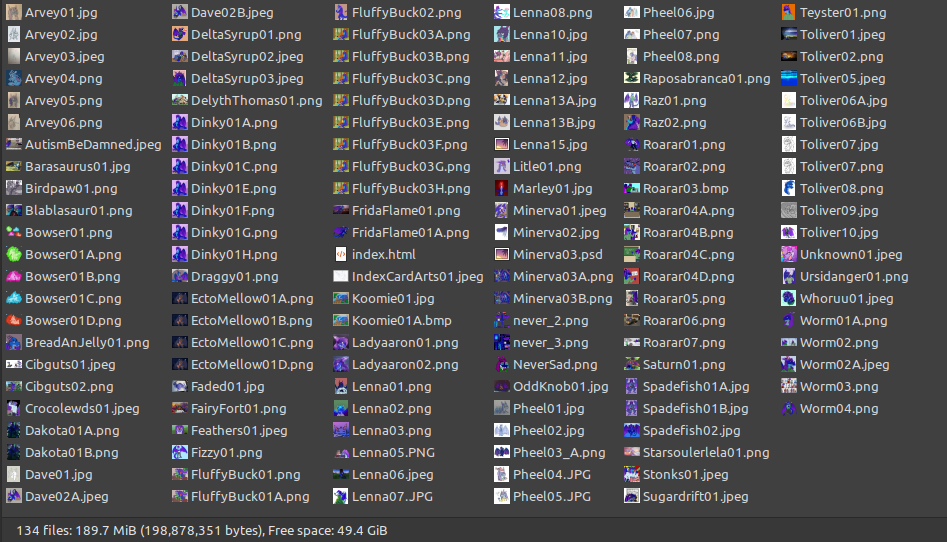
Thankfully, I was smart when I started this website, and kept with a consistent naming scheme: ArtistName01.file, and multiple edits being ArtistName01A.file This has made it easy to search for images, however it still has some flaws. For starters, if I don't remember the file extension, then I have to sit there hunting through them all just to figure out which one I need. And because my Website hosting service uses a Linux backend, file.png is different from File.png which is different from File.PNG; file names are case sensitive
  Pheel05.JPG cannot be found by making the .jpg lowercase
  SO! The first thing I need to do is rename everything properly, and make everything the same file extension
  .jpeg is best for website design, however I use this as an archive as well, so I'll be keeping them all as .png
The second thing I need to do, once I update all my gallery pages to reflect the name/extension changes, is fix where I store the web-safe compressed images. When you view that gallery, all the images you actually see are tho originals cut down to 25%; 1/4th of their full size. This helps page loading times by 400%. Currently, those images are stored in the same folder, meaning that when I go to look for a specific image, I'm also hunting through all the compressed ones as well. An annoyance in terms of archival purposes. So while I'm renaming all those images on the gallery page, I'll have to also redirect every single "Thumbnail" image to a new folder.
And then, once I'm done with Never, I have to do all this again with the other three

Anyways, I'm posting this as motivation to get this tedious work done I don't like tedious renaming, but I've been slacking for years on this, and It's only gonna get worse
Thankfully, I was smart when I started this website, and kept with a consistent naming scheme: ArtistName01.file, and multiple edits being ArtistName01A.file
This has made it easy to search for images, however it still has some flaws. For starters, if I don't remember the file extension, then I have to sit there hunting through them all just to figure out which one I need. And because my Website hosting service uses a Linux backend, file.png is different from File.png which is different from File.PNG; file names are case sensitive Pheel05.JPG cannot be found by making the .jpg lowercase SO! The first thing I need to do is rename everything properly, and make everything the same file extension .jpeg is best for website design, however I use this as an archive as well, so I'll be keeping them all as .pngThe second thing I need to do, once I update all my gallery pages to reflect the name/extension changes, is fix where I store the web-safe compressed images. When you view that gallery, all the images you actually see are tho originals cut down to 25%; 1/4th of their full size. This helps page loading times by 400%. Currently, those images are stored in the same folder, meaning that when I go to look for a specific image, I'm also hunting through all the compressed ones as well. An annoyance in terms of archival purposes. So while I'm renaming all those images on the gallery page, I'll have to also redirect every single "Thumbnail" image to a new folder.
And then, once I'm done with Never, I have to do all this again with the other three
Anyways, I'm posting this as motivation to get this tedious work done
I don't like tedious renaming, but I've been slacking for years on this, and It's only gonna get worse  i love looking at your art pages